wasmCloud GitHub Actions
wasmCloud GitHub Actions
wasmCloud provides four GitHub Actions for CI pipelines:
| Action | Description |
|---|---|
wasmCloud/setup-wash-action | Installs the wash CLI on the runner |
wasmcloud/actions/setup-wash-cargo-auditable | Configures cargo-auditable to embed SBOM data in Rust builds |
wasmcloud/actions/wash-build | Builds a Wasm component, outputs the path to the built artifact |
wasmcloud/actions/wash-oci-publish | Publishes a component to an OCI registry with optional attestation and SBOM |
setup-wash-action
The setup-wash-action installs wash, adds it to PATH, caches the binary, and installs the wasm32-wasip2 Rust target.
- uses: wasmCloud/setup-wash-action@main
  with:
    wash-version: "v2.2.0"    # version to install (default: latest)
setup-wash-cargo-auditable
The setup-wash-cargo-auditable action installs cargo-auditable and cargo-audit, then configures .wash/config.yaml so that wash build uses cargo auditable build under the hood. This embeds dependency metadata in the compiled binary for later SBOM extraction.
A Cargo project (Cargo.toml) must already exist in the working directory before calling this action, as it reads the package name to determine the component output path.
- uses: wasmcloud/actions/setup-wash-cargo-auditable@main
  with:
    working-directory: "."  # directory containing the project (default: .)
wash-build
The wash-build action runs wash build --output json and exposes the path to the built component as a step output.
- id: build
  uses: wasmcloud/actions/wash-build@main
  with:
    working-directory: "."  # directory containing the project (default: .)
Output: steps.build.outputs.component_path — path to the built .wasm file.
wash-oci-publish
The wash-oci-publish action pushes the built component to an OCI registry. When attestation is enabled, the action generates build provenance and an SBOM (converted from CycloneDX to SPDX format).
- uses: wasmcloud/actions/wash-oci-publish@main
  with:
    component_path: ${{ steps.build.outputs.component_path }}  # required
    registry: ghcr.io                                          # default: ghcr.io
    attestation: "true"                                        # default: false
image_tags: "latest,v1.0.0,${{ github.sha }}" # default: branch nameWhen attestation is enabled, the workflow needs the following permissions. See Supply chain security for details.
permissions:
  contents: write
  packages: write
  attestations: write
  id-token: write
Attestation
When attestation is enabled, the wash-oci-publish action generates cryptographically signed metadata that links a published artifact back to the source code, build environment, and dependency tree that produced it. This enables consumers to verify that an artifact was built from a specific commit in a trusted CI pipeline.
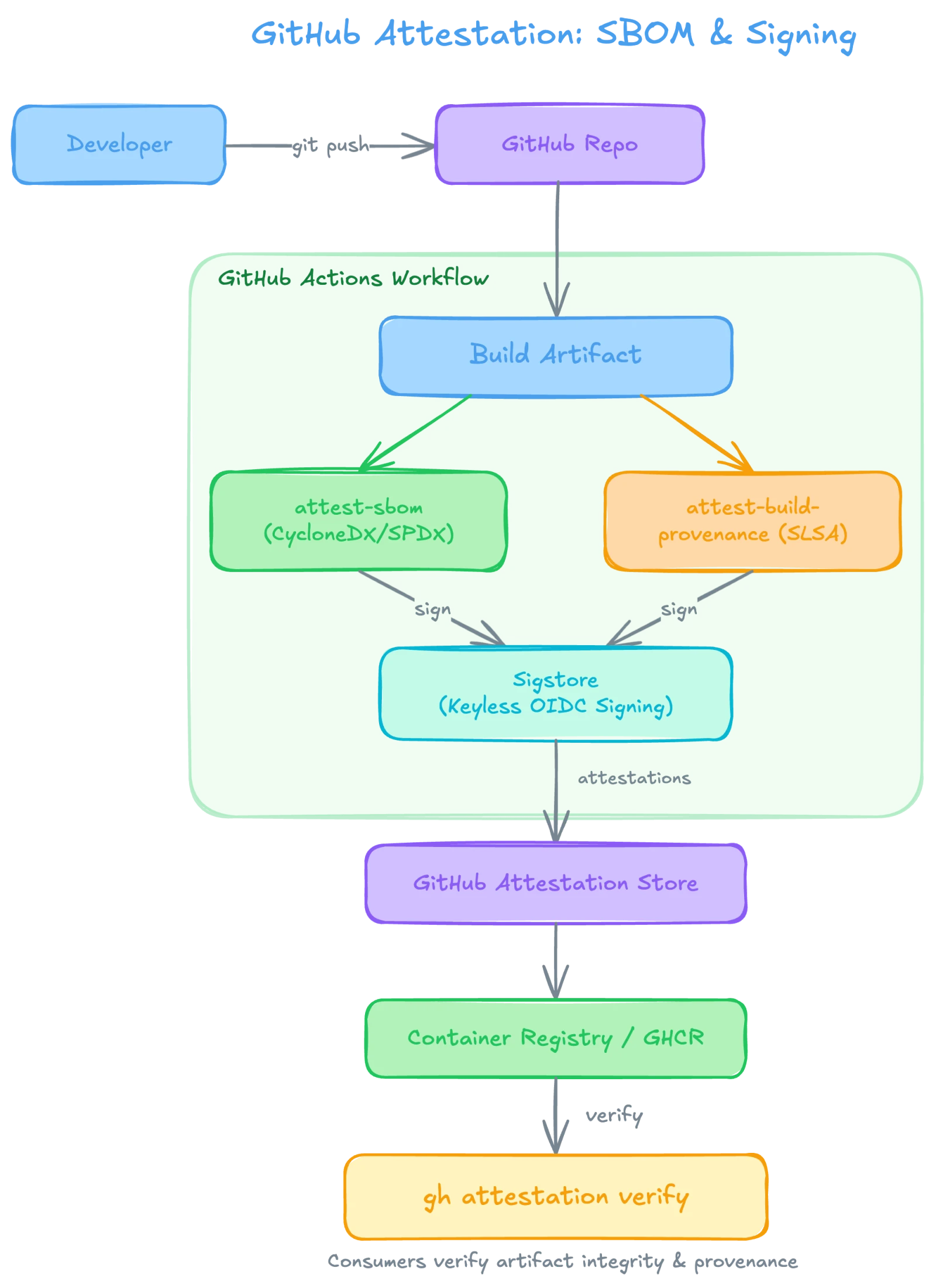
The attestation flow works as follows:
- A developer pushes code to a GitHub repository, triggering a GitHub Actions workflow.
- The workflow runs
wash build(withcargo-auditable) to compile the component, embedding dependency metadata in the binary. - Two attestations are generated in parallel:
attest-sbomextracts a CycloneDX SBOM from the binary, converts it to SPDX format, and creates an SBOM attestation.attest-build-provenancegenerates SLSA build provenance, recording where, how, and from what source the artifact was built.
- Both attestations are signed via Sigstore using keyless OIDC signing—no manual key management required.
- The signed attestations are stored in the GitHub Attestation Store and associated with the published artifact in the container registry (e.g., GHCR).
- Consumers can run
gh attestation verifyto confirm the artifact's integrity and provenance before deploying it.
Example: Build and publish pipeline
The following GitHub Actions workflow builds a Rust-based Wasm component with auditable dependency metadata, publishes it to GitHub Container Registry, and generates supply-chain attestations:
name: Build and Publish Component
on:
  push:
    tags:
      - "v*"

permissions:
  contents: write
  packages: write
  attestations: write
  id-token: write

jobs:
  build-and-publish:
    runs-on: ubuntu-latest
    steps:
      - uses: actions/checkout@v6

      - name: Setup wash CLI
        uses: wasmCloud/setup-wash-action@main

      - name: Setup cargo-auditable
        uses: wasmcloud/actions/setup-wash-cargo-auditable@main

      - name: Build component
        id: build
        uses: wasmcloud/actions/wash-build@main

      - name: Publish component
        uses: wasmcloud/actions/wash-oci-publish@main
        with:
          component_path: ${{ steps.build.outputs.component_path }}
          registry: ghcr.io
          attestation: "true"
          image_tags: "latest,${{ github.ref_name }}"
This pipeline triggers on version tags (e.g. v1.0.0). The published image will be tagged with both latest and the Git tag.
For closing the loop with Argo CD or Flux, see GitOps with Argo CD.
Supply chain security
The wasmCloud GitHub Actions support a full supply-chain security pipeline using cargo-auditable, CycloneDX, and GitHub's built-in attestation actions.
The attestation flow works as follows:
setup-wash-cargo-auditableconfigurescargo-auditablevia.wash/config.yamlso that dependency metadata is embedded in the compiled binary duringwash build.wash-oci-publish(withattestation: "true") extracts the embedded metadata and generates attestations:- Extracts a CycloneDX SBOM from the binary using
auditable2cdx - Converts the SBOM to SPDX format using
cyclonedx-cli - Generates an SBOM attestation via
actions/attest-sbom - Generates build provenance via
actions/attest-build-provenance
- Extracts a CycloneDX SBOM from the binary using
For attestation to work, the workflow must include the following permissions block:
permissions:
  contents: write       # required for attestation uploads
  packages: write       # required for OCI registry push
  attestations: write   # required for attestation creation
id-token: write # required for OIDC token (provenance signing)Without all four permissions, the attestation steps will fail. If you don't need attestation, you can omit these permissions and set attestation: "false" (the default).